Showing posts with label Internet Tips. Show all posts

Wednesday, October 20, 2010

Offline Browser and Webpage downloaders

5 Free Offline Browser and Webpage downloader
Here are the lists of 5 Freeware from which you can download any WebPage easily.

NetMan

   No more clicking 50 times on the ‘Back’-Button of your Browser to save some pictures. No more downloading hundreds of thumbnail-pictures. KIPPING’s NetMan was first developed for users that collect pictures from the Internet – but its versatility and the permanent extension with new functions make it to an powerful DownloadManager.

HTTrack Website Copier

   It allows you to download a World Wide Web site from the Internet to a local directory, building recursively all directories, getting HTML, images, and other files from the server to your computer. HTTrack arranges the original site’s relative link-structure. Simply open a page of the “mirrored” website in your browser, and you can browse the site from link to link, as if you were viewing it online. HTTrack can also update an existing mirrored site, and resume interrupted downloads. HTTrack is fully configurable, and has an integrated help system.

GetLeft

   It is supposed to download complete Web sites. You give it an URL, and down it goes on, happily downloading every linked URL in that site.

WebReaper

   WebReaper is web crawler or spider, which can work its way through a website, downloading pages, pictures and objects that it finds so that they can be viewed locally, without needing to be connected to the internet. The sites can be saved locally as a fully-browsable website which can be viewed with any browser (such as Internet Explorer, Netscape, Opera, etc), or they can be saved into the Internet Explorer cache and viewed using IE’s offline mode as if the you’d surfed the sites ‘by hand’.

BackStreet Browser

   It is a free, powerful offline browser. A high-speed, multi-threading website download and viewing program. By making multiple simultaneous server requests, BackStreet Browser can quickly download entire website or part of a site including HTML, graphics, Java Applets, sound and other user definable files, and saves all the files in your hard drive, either in their native format, or as a compressed ZIP file and view offline.
SOURCE: PCHACKS

Wednesday, October 6, 2010

GET GOOGLE CHROME FEATURE IN INTERNET EXPLORE

GET GOOGLE CHROME FEATURE IN INTERNET EXPLORE    
   Google has released Chrome frame, a Open source plugin that allows Internet Explorer to use the HTML 5 technology for more advanced websites. It adds the features like HTML 5 support, better Java script support, webkit and v8 engines for rendering pages in Internet Explorer.

   If you don’t want to move to Google Chrome from IE then you can add this plugin to yourInternet Explorer and enjoy the features of Google Chrome on your Internet Explorer. The addition of this plugin makes the Microsoft browser fast and compatible with the sites using advanced technology.


GET: GOOGLE CHROME FRAME FOR IE

Saturday, September 18, 2010

The Most Easy Way To Share Photos Online

The Most Straightforward Easy Way To Share Your Photos Online    
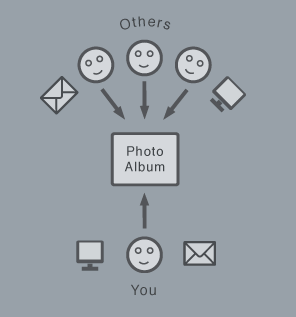
    Apart from it's intuitive conference, Yogile's real strength lies in multi-user support. Once you create a Photo album on the service, you get a custom URL that you can share with others you want to upload to your page. There's no need for them to register, and the process is simple, fast, and secure.
Yogile Photo Sharing
    With options to upload by e-mail, mobile MMS and on the Yogile site, sharing and storing images is kept as easy as possible. Public, private and moderated albums are available to give a solid balance between simplicity and fine grained customization regarding who can see and upload which photos.
   Take a conference, for example. Dozens of different attendees take their own photos, all from different cameras and angles. While you might try a mass email campaign afterward, asking everyone for their shots, Yogile offers a smart alternative.
    You simply create an album on the site, and instantly receive a custom URL you can share with anyone who wants to upload images to your page. There's no need for these users to register private information, no extra barrier keeping them from adding content to your album. The process is fast, reliable, and free.
Visit : YOGILE


Friday, August 6, 2010

IE 9 PREVIEW FOR DOWNLOAD

IE (INTERNET EXPLORER) 9 PREVIEW FOR DOWNLOAD    
      Microsoft Internet explorer 9 is showing some steady and impressive progress as the development cycle is inching towards a public beta release, Microsoft is emphasizing support for modern web on IE6 platform capable of delivering rich HTML5 experience that feel more like native applications than websites - supporting hardware-accelerated SVG, canvas, audio, video,and text, IE9 will be harnessing full potential of the PC to achieve best performance.
To further strengthen the ultimate goal of an fast, modern, web-browser IE9's fourth developer preview is now available for download with support for fully hardware-accelerated HTML5 and new test-drive demos showing modern SVG and native Javascript integration in action.

Sunday, July 18, 2010

LOAD FIREFOX BROWSER FASTER

LOAD FIREFOX BROWSER FASTER WITH SPEEDYFOX      
     It allows the user to customize the browser in the way he wants. More secure then any other browser available in the market.  But it also has some disadvantages like it may take long for firefox to get started. It happens because of overburdened internal database.

      You can make your firefox start faster by cleaning up the SQLite database of it. This can be done by using SpeedyFox. SpeedyFox compacts the database of FireFox that too without any loss of data.
  Just download this tiny software and run and click on SPEED UP MY FIREFOX tab..That is seen above image..Feel the difference in speed of your firefox Browser..

FOR DOWNLOAD:CLICK HERE

Thursday, July 15, 2010

FIRST BROWSER DEVELOPED BY INDIANS

FIRST BROWSER DEVELOPED BY INDIANS MOZILLA EPIC
     Bangalore based startup Hidden Reflex has announced the launch of its browser "Epic", which aims at making Indians all over the world proud.

First Browser with an Indian Origin - Epic
    Epic, which also happens to be the first entirely Indian made web browser, is based on the Mozilla platform and comes with quite a bunch of India centric features. We did take it for a short spin and we came out quite happy with it. Before we look at the details, let's look at details about Hidden Reflex, the company behind the browser.

    The company was founded by the then U.S. based Engineer Alok Bhardwaj in 2007. However, the company is currently based in Bangalore. They initially had a team of three members and have now grown to quite a bunch of people who are working on two separate products. The first one, Epic, has already been launched. The other one is still in the making.


    Let's get back to the Epic browser now. After you install it, the first thing you notice is the bright colours of the browser. Epic is highly customizable and initially comes with a "Peacock" background that isn't too easy on the eyes. Of course you can change your background with any of the zillion ones provided by the browser or choose one of your own. Even at the launch, there are over 1,500 themes available and compatible with Epic. The browser has a host of applications on its sidebar from where you can launch them. These include Twitter, Facebook, and other similar services. Clicking on any of these icons will launch a widget like window on the side of the browser. The bad thing about this is that you can only open one such widget per window.

    Epic also comes with anti-virus protection built-in - a first for any browser. It also supports a long list of Indian languages (currently 12) and an India content sidebar that aggregates news headlines, TV to live cricket commentary and other things that matters to us Indians. It also features a bunch of productivity applications that include a free word processor, video sidebar and my Computer Browser.

The Epic browser is now available for download from here. 


SOURCE: TECHTREE

Wednesday, July 7, 2010

EXPORT FIREFOX BOOKMARKS TO GOOGLE CHROME

EXPORT FIREFOX BOOKMARKS TO GOOGLE CHROME BROWSER

       If you want to Import your all bookmarks from Firefox to Google Chrome Browser... Just Follow the steps below to have your Bookmarks on Google Chrome....
  1. Open Firefox and click on “Bookmarks” in menu bar. There click on organize bookmarks.
  2. A new window will open. In that window click on “Import and backup” and select export HTMLSave the exported bookmark.html file on your desktop.

FIREFOX 4.0 BETA HAS BEEN RELEASED

FIREFOX 4.0 BETA HAS BEEN RELEASED
            The World's Vastly using Browser FIREFOX is just released they new version of we browser FIREFOX 4.0 BETA...


Main Features of this Latest Browser:
  • Add-ons Manager: More space to efficiently manage your favorite add-ons, plugins and themes.
  • HD Video: The future WebM format is supported and promises HD-quality hardware accelerated HTML5 video on the web.
  • HTML5 Support: Better HTML parsing, support for HTML5 form controls and also runs the latest web apps based on HTML5 such as Google's Gmail and Yahoo's Mail interface for the mobile phones.
  • Full WebGL support for in-browser 3D rendering.
Apart from these features, the new Firefox 4.0 beta also promises performance improvement and the necessary security improvements to protect browser history. 


FOR DOWNLOAD AND MORE INFO: CLICK HERE


Friday, July 2, 2010

CREATE LABLES IN GMAIL

CREATE LABLES IN GMAIL AND ADD MESSAGES
      Using labels for mails and filtering all the important mails can be really helpful in such situations. Label in your Gmail is just like a folder on your computer. The only difference is you can attach more than one label to a mail.
Here is step by step guide on creating a label and filter for all incoming mails.
To create a label:
  1. Click the Labels drop-down menu or if you have keyboard shortcuts enabled, type l. Or, just click Settings > Labels.
  2. Select Create new.
  3. Type the name of your new label and click Ok
To add messages to that label you will have to create a new filter.

Wednesday, June 16, 2010

INSERT YOUR OWN PICTURE TO GOOGLE SEARCH ENGINE

INSERT YOUR OWN PICTURE TO GOOGLE SEARCH ENGINE HOME PAGE
    Every one knows about BING search engine in that site you see daily automatically customized wallpaper could be seen in that search engine home page..As like BING you can also customize your own image for google search engine homepage.. Here see the below image as made up changes...
     Google search Engine is Giant in internet... Google recently added a new feature..Let you will able to put a wallpaper to the google search engine...Just follow the steps below...

Tuesday, June 15, 2010

MAKE IE FAST FOR SLOW INTERNET CONNECTION

MAKE IE(INTERNET EXPLORER)  FAST FOR SLOW INTERNET CONNECTION USERS
      Normally Internet Explorer is a slow browser for heavy load of add-ons... For Slow internet connection user may very un satisfy with it.. Here I am giving 3 simple tips..
             By Implementing this 3 tips on Your Internet Explorer browser You will be able to fasten up your internet Explorer Browser..


IE Trick 1
  1. Launch Internet Explorer, and select the option Tools -> Internet Options.
  2. Select the Advanced tab.
  3. In the Settings field, scroll down to the heading called Multimedia. There, you have to clear the check-boxes next to the following options (as per your preference):
    1. Play animations in webpages
    2. Play sounds in webpages
    3. Show pictures
  4. Click on Apply, and then OK.
However, the problem with this tweak is that it will greatly restrict your internet experience – all at the cost of speed. This might not be an attractive option to many.

Saturday, June 12, 2010

REDUCE FIREFOX STARTUP TIME

REDUCE FIREFOX STARTUP TIME WITH FIREFOX PRELOADER
     Firefox is a best browser ever..But it can also slow in some situation like we add more add-ons to it at that time the browser take more time to load all add-ons.. But here have one software which called FIREFOX PRELOADER..
  It's a tiny but powerful software it can load your all firefox add-ons when your system starts.. So next time you start firefox the browser starts with in seconds..
DOWNLOAD HERE

CREATE YOUR OWN TEMPLATES

CREATE YOUR OWN TEMPLATES  WITH GOOGLE DESIGN IN BLOGGER
    
    Good news for blogger users.. Now no need to waste your time to search for a pre designed Templates for your blog on net.. Google has announced a new feature for its blogger.. That is TEMPLATES DESIGN... By using this we can change our Blog templates with easy interface... To have this You will be the template designer... Just follow the instructions below..
HOW TO USE THIS FEATURE IN BLOGGER
     Just Sign In to Your Blogger Account.. (www.blogger.com)... Then Select DESIGN and then click TEMPLATE DESIGNER then you will access Template Designer page..

Friday, June 11, 2010

SEARCH INTERNET SECURE WITH GOOGLE SSL

SEARCH INTERNET SECURE WITH GOOGLE SSL
    Google SSL service is a well knows older service that will encrypt your search web pages from hackers...
Do you notice while we are using Mailing services some Online banking sites.. 
HOW DO WE EXPECT THE PAGE IS SECURE:
The Address bar of a corresponding page will be changed as https:/ instead  of http:/ ...and the color of an address bar in yellow.. and a Lock symbol will display on the right side of the end of address....

Saturday, May 15, 2010

CHECK YOUR MAILS OF GMAIL WHEN OFFLINE MODE

CHECK YOUR MAILS OF GMAIL WHEN OFFLINE MODE
  I hope this post will help for the people who have limited Internet service plan and those who have slow internet connection...
img_115752_gmail-logo.jpg (450×337)
    Gmail recently introduced a grate feature for those people who have the problems above...By this feature you can able to check your mail when you have no internet connection (Offline)..
 To have this feature avail on your computer do like below...

    First Sing in to your Gmail account.. Than Navigate to Settings > Offline > (Select) Enable Offline Mail for this Computer then Save Changes
After selection Save Changes Tab The wizard will Opens like below Then Select Install

Saturday, May 8, 2010

sort between different search engines on single site

SORT BETWEEN DIFFERENT SEARCH ENGINES ON SINGLE SITE    
     If we have to search a same keyword(flower) on different search engines...we will open those corresponding search engines like Google, Yahoo, Bing, on different tabs..then will type that keyword and search...Here is a simple way to search these keyword on one page...It can possible with SCOUR...
        Scour is a search engine like Google, Yahoo, But it is different with all existings...Image search is also perfect in this site...try it..

Here is a link...http://www.scour.com/

Thursday, May 6, 2010

How to Download Mulitple Files in Rapidshare

How to Download Mulitple Files in Rapidshare  
With Multi file downloader now your can download Download Mulitple Files in Rapidshare with ease. this software will help you to download multiple files from the world's largest file-sharing network Rapidshare.
Rapidshare Multi file DownloaderFeatures of the Rapidshare Multi file Downloader

  • Download a group of links from rapidshare (one by one)
  • Download incomplete downloads until all links are downloaded
  • Load and save the download list

Friday, April 23, 2010

TRICK TO REDIRECT ANOTHER WEBSITE

TRICK TO REDIRECT ANOTHER WEBSITE
     A simple text file edit makes sites redirect to another. When you type
address in address bar in any browser and enter it then it will display
another web page, for example:- when you type Google.com you will be redirected to yahoo.com

Instructions to do:

1) Go to this directory [c:\windows\system32\drivers\etc], directory may change according to drive used for os installation
2) then hit enter
3) find a file named "hosts"
4) Right click on it and open with word pad.
5) In the last link of the document type the IP* address of yahoo space www.Google.com (Vice versa for other sites)
6) now save it
7) restart the browser if its already running
8) Now try it, It works perfect

To Know IP address of website:


  To find IP address of that website Goto start >>Run >> type cmd
>> enter.    Now you have a new window on desktop On that type this
without qotes "ping www. yahoo.com"
replace yahoo.com with your preferred site and then enter it
   Recover Option: Repeat the first four steps and remove the last line
that you have inserted and save it and restart browser. Now its back to
normal

Wednesday, April 21, 2010

Sharing Internet Connection using WiFi (Windows XP)

Sharing Internet Connection using WiFi (Windows XP)
      Here is the situation, you have two (or more) laptops (or PC) with WiFi capabilities. You don't have any router, switch, hub, or whatsoever. Just a single Internet port enough for one of your computer. Don't be worry, because you still can share the Internet connection by using ad-hoc network.

First, you need to pick one of those computers as a "server". Connect it to the Internet using the usual way. Next, open Control Panel>Network and Internet Connections>Network Connections. Open the Wireless Connection Properties. Change tab to Wireless Networks then click Add... button. Under theAssociation tab, input your Network Name as you like. Clear the The key is provided for me automatically check box and select the This is a computer-to-computer (ad hoc) network check box. Fill in the Network Key along with the confirmation with a 13-digit password and then press OK. Press OK once again to close the dialog box. Now you have finished with the first computer.

Saturday, April 17, 2010

PC Game Compatibility Tester


PC Game Compatibility Tester
    Do you have your eyes set on a game you want to try on your Windows PC, but are afraid of not having enough processing power? Fear not- because I recently stumbled onto a site that will check to see if your PC is up for the challenge, or not.SystemRequirementslab.com features a drop-down list of the hottest PC games, forcompatibility-testing on your computer.
PC Game Compatibility Test ImageWith the use of Java, it will check your hardware, and let you know if you meet the minimum, or recommended requirements, and break it down in detail.