Monday, April 2, 2012

The Logitech Tablet Speaker


Let’s face it, tablet PCs don’t have the best speakers. So why not make them louder with the new Logitech Tablet Speaker.
The Tablet Speaker might look like it is only made for the iPad, but it is actually good for any tablet, thanks to the rubberized clip. So if you have a Galaxy Tab, Motorola Xoom, or any type of Android tablet, you should get it.
The Tablet Speaker uses a 3.5 mm audio cable connection, so it will work on smartphones, laptops, or any other type of device with a headphone jack. As for power, it has a built-in rechargeable battery that is good for about 8 hours worth of sound via USB charging.
I wonder if I could use it on my laptop, or would the weight of the speaker weigh my screen down until it is bent over flat. I guess that I would have to try it out in order to see what the result would be. Whatever the case, something tells me that we will be seeing a lot more tablet accessories like this in the future.
I’m not certain when the exact release date for the Logitech Tablet Speaker is, but you can pre-order it for a price of about $49.99.

Friday, March 16, 2012

Toshiba announces Exceria line of high-speed SD cards


Toshiba's Exceria SDXC and SDHC flash-memory cards
(Credit: Toshiba)
Toshiba has announced new SDXC and SDHC cards that support the UHS-1 high-speed interface--and the new Exceria brand name to go along with them.
The Exceria name is meant "to reflect a combination of 'excellent' and 'experience,'" Toshiba said in a statement this week, but I wouldn't have guessed that without being told. Too bad Sony got there first with Xperia.

The new cards come in three varieties. At the top of the heap are models that will arrive in July with read speeds of 95MBps and write speeds of 90MBps; they'll come in 8GB, 16GB, and 32GB sizes.
In the middle of the pack are 16GB, 32GB, and 64GB models arriving in August. They read at the same rates but are slower at writing at 60MBps.
Finally come models with 90MBps read speeds and 30MBps write speeds. The 8GB and 16GB are scheduled to arrive in April and the 32GB model in May.
Toshiba, which is a major power in flash memory manufacturing, didn't announce prices.
Source : CNET

Monday, February 20, 2012

ALL ABOUT SYSTEM SECURITY


   Today I am going discuss some system security tools... Suppose we install the full version and fully updated antivirus also...Eventhough we won't have any  security with our system....So we need to run some Latest version of virus removal tools...Most of antivirus companies offering some virus removal tools.
What is Virus Removal Tool:
    Its a some latest virus definition tool that released by the anti virus software company before updating into there main servers..Using this tools we can eradicate the virus before enters to our system.
    Monthly once we need to download this new version of tools and run in the system...These tools will scan the critical part of your system and found if there any new treats found in your system instently remove the virus..

1.Norton Power Eraser
     
  This tools capacity is around 8MB once we download and run this tool it asks for scan the system choose scan...the process will run 10 to 15 mins depending upon the system config.. Completion of scan if any virus found select the treat and choose FIX option and again the process will run...After completion of entire process ask for restart...you done...


2. Mcafee Stringer
    This tool also same like Norton power eraser...The whole process will be instructed in the below link...


TOTAL SOLUTION FOR PDF DOCUMENTS ONLINE


  If you feeling difficulty with working PDF documents... Below mentioned sites will useful to those people which they want to do modifications with their PDF document.

1.Online PDF compressor, converter, Merger, Resizer
     This is power online allows your to convert,merge,Resize any PDF Document..

2.Online PDF Editor
    You can Edit PDF Documents online by accessing below link..

3.PDF Software Free Download
   Free software for PDF Merge,convert,Resize

Tuesday, January 3, 2012

10 REASONS GOING FOR ANDROID


Here are the top10 reasons why Android is an ideal choice for every one:
  1. Native Google Support : It means you get your Emails,Google & Orkut Contacts, Gtalk, Google Maps,Google calender all in one place; Synchronized with your phone. Yes they are synchronized with your phone & everything can get updated on the web & in the phone at one go.
  2. A phone for every budget, Unlike iphone , Android phones are available from a variety of manufacturers, It doesn’t matter if your budget is Rs.6000 or Rs.30,000/-, You will get a phone that fits your budget, The only thing that varies is hardware inside the phone. ( But be rest assured, These are all better than what you get from traditional Nokia phones.  )
  3. Facebook app imports all the facebook contacts to android & you get to see the pictures of your facebook contacts when they call up. Same goes for twitter. The facebook app views photos in a super cool way, It shows high definition full screen slideshow on the phone, It really feels as if the photos were lying on the phone memory. The photo descriptions appear right inside the slideshow thats good too.
  4. Whether its the remaining battery or new chat or a new email, Everything comes with SMS style notification (Yes you can customize them).
  5. Google’s voice search is in, Want to dial a number or find a contact? Speak it, Your android is smart & can listen to what you say, literally !
  6. Doesn’t require specialized data plans like blackberry, Android works on normal WAP, GPRS , Edge & 3G, No matter what internet is available from your operator , Your phone will manage everything Chat, Email , Maps. Wifi can be configured in just 2 taps.
  7. Portable Wi-fi Hotspot is now in your pockets, With Android 2.2 & newer versions you can convert your phone into a portable wi-fi hotspot. (Yes your laptop can connect to the internet & use the maximum speed supported by your mobile operator. Which means if you have 3G activated on your Sim card, You will enjoy super fast internet on your laptop at no extra cost).
  8. Do you know, Android market has an app that converts your phone in to a metal detector? well, you should check it atleast once, It works like charm.
  9. Android makes communication almost free with just one unlimited data plan from your service provider; How?Well the YAHOO messenger app  has an option to make voice calls to others who use yahoo messenger for free. It works using Wi-fi, GPRS, Edge & 3G. So if you have a friend who has android with yahoo messenger installed
  10. Last but not the least, Android has official adobe apps to read PDF files & to view Adobe Flash on internet. Android has full html browsers with pinch zoom(Haha, Iphone users we have everything better than what you have.).
Since most apps on android are available for free, Android has already rocked the world & stopped iphones and blackberries from dominating the smart phone market.

Friday, December 30, 2011

10 Useful Excel Tips and Tricks


1. Wrapping texts in a single cell.
You can wrap texts in a cell. Doing this, it will display multiple lines with in the
cell. You can wrap texts in a cell by pressing ALT + Enter in the cell. Or you can go to
Format –> Cells –> Alignment and select Wrap Text.

2. use of Enter key
When you hit the ENTER key in Excel, you will automatically drop down to the
cell just below it. But you can change this default and change this feature.
a. Go to Tools -> Option
b. Select the Edit Tab
c. Under Move Selection after Enter, you can either select a different
Direction for the drop down box, or remove the check in front of the option according to your need.
Note: If uncheck it, the ENTER key will not move
you to another cell rather you’ll need to use the arrow keys to move around.
3. Current date or time
You can use the following formula to get current date with time in excel.
=NOW() ?shows both, current date and time.
=TODAY() ?shows only today’s date.
In bonus with this trick, =Time(hours, minutes, seconds) value gives you the time you entered in specific format.
For example: =TIME(1,2,3) outputs, 1:02 AM
=TIME(21,2,3) outputs, 9:02 AM
4. Shading the rows alternately
This tips can be helpful if you most of the time gets confused on the rows you are watching. Applying shades as you have seen in most of the graphical representation papers around you helps you to avoid confusion.
To do this,
• Highlight the range of cells or rows or columns that you want to format by left clicking and dragging the area.
• Go to Format–>Conditional Formatting
• In the Conditional Formatting dialogue box, select Formula Is from the first drop-down list box, and enter =MOD(ROW(),2)=0 in the second box.
• Click the Format button to bring up the Format Cells dialog box.
• Select the Patterns tab and specify a color for the shaded rows.
• Click OK twice to return to your worksheet.
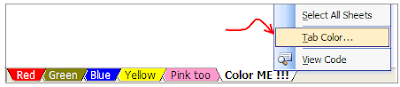
5. Change the color of sheet names:
Right click on sheet you want to change the color of and select “Tab color” option to change the worksheet tab colors. Group them with similar colors if you have lot of sheets, it lets you to easily recognize the specific sheet.

Tuesday, December 20, 2011

Transform your Windows XP in to Windows 7


  If you are using Windows XP and want to experience Windows 7 without installing then here is Seven Remix XP transformation pack to transform Windows XP to Windows 7.With this simple app you can make your XP look like Windows 7 in just few clicks. It supports Windows XP, Windows 2003, Windows Media Center Edition and some other flavors of XP. Will work with only 32 bit edition of Windows.

Just download it and install .
Download Seven Remix XP and transform your windows xp .

Tuesday, May 24, 2011

ALL YOUR GOOGLE SERVICES AT ONE PLACE


ALL YOUR GOOGLE SERVICES AT ONE PLACE


As many of you know, Google has grown from just a search engine to a company which offers various internet services. There are many services that Google offer. But, the question arises, How do you maintain and stay in touch with the services offered by google? 

Yes, you have got a service for that too. Gpanion, is a Global Google dashboard which provides quick access to all your Google services. Gpanion also helps you to customize apps depending on your app usage. You can open any service by just click on it. Each service opens in a new tab, making a way for multi-tasking.

Gpanion looks simple and elegant. Overall it's a nice place to quickly access all your Google services.

Visit Gpanion

Saturday, May 14, 2011

Create A Mosaic Pattern Using Your Facebook Friend’s Photos


Create A Mosaic Pattern Using Your Facebook Friend’s Photos
   By using Photoshop techniques we can create mosaic pattern of the our photos.But this takes some time and need some photoshop skill to develop it.But can u ever imagined of creating the mosaic pattern using your (Twitter/Facebook, Myspace) Friends,one such tool is provided by Frintr.com
32 Create A Mosaic Pattern Using Your Facebook Friends Photos
It doest needs any signup/registration,you can simply log in Using your (Twitter/Facebook, Myspace) Account. And upload your photos and start creating new mosaic pattern wallpapers and posters
Start Creating Mosaic patterns:visit  http://frintr.com

Friday, May 13, 2011

Copy Firefox passwords to new os Backup firefox password file


All firefox passwords are stored in three files
signons.txt, signons2.txt, key3.db


These files are stored in your firefox profile folder.

In Windows XP firefox profile is at:
c:Documents and SettingsWindowsUsernameApplication DataMozillaFirefoxProfilesprofilename
Copy these three files and save them where ever you want and if you want these passwords in your other os also then just replace these three files.

How to view saved passwords in Mozilla Firefox


How to view saved passwords in Mozilla Firefox  
Many times it happens that you store a password in your desktop PC and next time when you need to type that password again to use somewhere else you don’t remember it. Instead of asking for a new password you can simply find out your old password from Firefox. Just follow the steps given below. I will be using the Firefox 4 for this. Same can be done in older versions as well.
  1. Click on the Firefox button (Left-top) .
  2. Select Options -> Options. 
  3. An options window will pop up. In this click on security tab and under this click on “Saved Passwords” button. 
  4. Find the site name and the username you are looking for using the search box and click on the “Show Passwords” button and you can see the previously stored password.

Use MozBackup to easily backup your Mozilla firefox and thunder bird


Use MozBackup to easily backup your Mozilla firefox and thunder bird  
You never know when your PC gets infected or corrupted and you might have to format your system. So it is always good to keep backup of all your important things ready. MozBackup is one of the tools which you can use to create backup of your Mozilla apps e.g. Firefox, Thunderbird, SeaMonkey, Netscape etc.
   Using this freeware you can easily backup your browser data, bookmarks, cookies and  many other things with only few clicks of your mouse and all from a single window. Which makes your task much more easier.
    After downloading and installing the software it will scan your PC for all the supported products and list them. Select mozilla firefox from the list and click next. Select the profile you want to create backup for. If you have only one profile then select default and click next. You can select the options from the list which you intend to create backup for.   It also allows you to set a password for the backup created using this software.
  This app allows you to backup your Firefox in easiest way. This app is available for Windows operating systems only. You can download this freeware from the link below.
Download MozBackup - MozBackup-1.5.1-EN.exe
Source: Tips form Geek

Easily synchronize your office documents with Google Docs


Easily synchronize your office documents with Google Docs
Google Docs is one of the most amusing and most useful service available on the net. If you are a frequent user of Google Docs or you always want to have your worksheets or office documents available then SyncDocs is for you.
Google Docs synchronizationSyncDocs is a free program which allows you to synchronize files between your computer and your Google docs account. It is similar to what DropBox is for your other files. Whenever you make changes to files on your local disk the same changes will reflect in your google docs file if you are using SyncDocs.

Synchronize files with google docs - SyncDocs
SyncDocs automates the task of downloading files from your Google Docs account. You will not have to download each and every file manually from your account. When you add a new file to your Google docs account or syncdocs folder it is instantly synchronized with one another.If you have syncdocs installed on some other machine then it will also be in sync with the same account so in this way you can sync your files between multiple computers as well.
After downloading and installing Syncdocs from the link given below it will ask you for your google account username and password which you want to sync using syncdocs. Once you provide your account info it will automatically sync all your google docs file. You can also change your preferences as shown in the image above. Syncdocs can be used for taking backup of all your important documents as well. This smart tool is available for windows users only. You can download it from the link given below.

How to get back ‘Save and Quit’ in your Firefox 4


How to get back ‘Save and Quit’ in your Firefox 4
If you have been using the latest Firefox 4 then by now you might have noticed that the ‘Save and Quit’ option is missing when you try to close your Firefox with multiple tabs open. If you are missing this display message just like me then here is a small “how to” to get it back in your FF4. Follow the simple steps below.
  1. Open your Firefox 4.
  2. In the address bar (where you type tipsfromgeek.com) type “about:config” without quotes and press enter.
  3. In the next page it will warn you and ask you to promise that you’ll be careful. Click on the button and go to the next page.
  4. In the next page type browser.showQuitWarning and double click on the filtered entry to change its value to true.
  5. Now click on the close button of your FF4 to see if it is showing you the ‘Save and Quit’ message box and you are done.

CALCULATE CALORIES BY PHOTOS

CALCULATE CALORIES OF YOUR MEAL  
iPhone Screenshot 2
  Want to know the calories of your food...Just take the snapshot of you meal and goto the below mentioned link and upload....And wait for while then you will get the detailed nutrition report of you Meal...

Saturday, April 16, 2011

FREE FONTS DOWNLOAD WEBSITES


FREE FONTS DOWNLOAD WEBSITES

   If you were going to try the installation of latest version of fonts...Then browse the below sites you can get thousands of fonts for free...

1. Dafont

   download fonts for designing work in photosho, and for preparing slideshows..Dafo0nt contains more that 11,0000 free fonts it has got a wider variety of fonts like Fancy, Foreign Look, Techno, Bitmap, Gothic, Basic, Script, Dingbats and Holiday fonts,

  Currently there are 13.098 free fonts on Bstract fonts. And about 1 million unique downloads every month. You can easily view the fonts in many ways like latest, by category, by designer, by recent popularity, popularity climbers and sliders, similarity, best and worst rated, and more.
 Each of the fonts has a customizable string preview, character map, member comments, similar fonts as well as a font info tab with all kinds of helpful information about the font.
Urban fonts got amazing collection of free fonts and free dingbats. It has got more than 8,00 freeware fonts to download and install it.
 
Font space contains 13,000+ fonts that have been shared by designers around the world. You can find wider range of cool fonts in font space.

5. Fawnt

Fawnt is a resource for designers, developers, and anyone that loves free fonts. Fawnt lists beautiful fonts in nice speech bubbles coupled with a scrollable interface to make browing easy Fownt got more than 10,000 free fonts.

How to Install a font?

Unzip the files you have downloaded,
Windows 7/Vista: Right-click on the font files and click “Install”
Windows XP: Put the font files into C:\Windows\Fonts
Mac OS X: Double-click the font file  and click “Install font” button

Listen to the music stored in your Dropbox using droptunes


      Just log on to droptunes  and sign in with your dropbox username and password. It will automatically find all the music files stored in your dropbox folder and will list them in the music player.

    And for Google chrome there is an extension available for the same. So no matter where you are, you can listen to your favorite song at any point of time with this cool service.
LINK: DROPTUN

Monday, March 28, 2011

SOME GOOGLE SERVICES YOU MIGHT BE NOT KNOWING

SOME GOOGLE SERVICES YOU MIGHT BE NOT KNOWING
Google Moderator :Google moderator is based on a simple idea of sparking a discussion and collecting opinions from different people on a certain issue. You can share the question with others. You can also embed google moderator question on your blog or site.
Google Hot pot: Location based service where you can rate places as well as find places of your choice suggested by other users or your friends.This service is power by Google places.

Google Knol: Is a google project aims at user written articles in various categories. Knol is basically a knowledge sharing platform where users can connect with each other to share their view on a particular thing.

Google Fusion tables: It is service aimed at data management. Here data from various organization, people are available in the form of tables or excel sheets. Users can download the information from this site.

Google Health: This service from google allows you to keep track of your health. You can even record your health habits. Like how much you work out or walk daily. You can even share your health info online. Track your progress.Google Moderator
Google Accounts

Friday, March 25, 2011

PORTABLE DICTIONARY ALLOWS YOU TO KNOW THE MEANING OF A WORD ANY WHERE

Quicktionary TS Premium offers a portable dictionary that does more than just provide meanings 


            The Quicktionary TS Premium is also more than capable of scanning printed text and transferring it over to a PC for future or later reference. According to Wizcom Technologies, their products are developed using unique expertise in linguistics and image processing. This has led them to achieve ‘best-of-breed’ milestones in the fields of microelectronics, electro-optics and Optical Character Recognition (OCR) algorithm engines, hence leading to the birth of the Quicktionary TS Premium.
    The Quicktionary TS Premium itself can be customized using the Wizcard, which in essence is an extension card that enables additional content to be added to the Pen, including dictionaries, OCR languages and text-to-speech components. If you so desire, you can easily switch between the Wizcard and original flash card in order to take advantage of the wide range of content that are available.
FOR MORE INFO: CLICK HERE

Saturday, March 19, 2011

Instant Messages From 30,000 Feet


InFlight Messenger – Instant Messages From 30,000 Feet
InFlight Labs, LLC has deployed a powerful new online service called InFlight Messenger which leverages the aircraft's Wi-Fi connection to make it quick and easy for passengers to have single or group two-way text message conversations with their business associates, family and friends while in flight.
This proprietary technology combines the best features of instant messaging and text messaging to offer a new “Advanced Real-Time Communication” experience for its subscribers.